


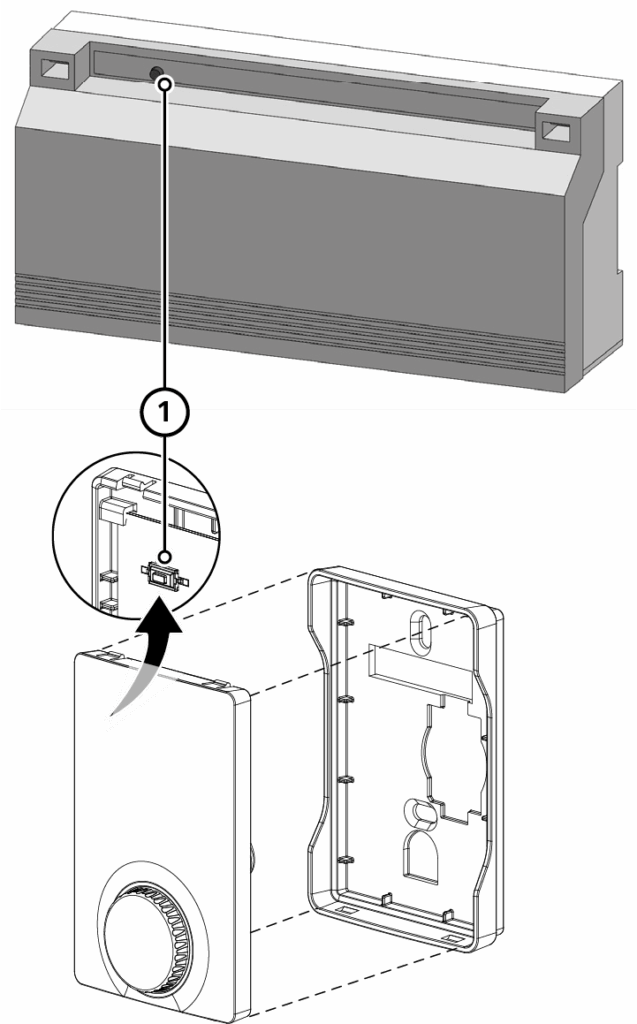
Note: Keep a minimum distance of 50 cm between the devices for teaching-in.
Press and hold: ≥ 3 sec, ≤ 10 sec
Press briefly: ≥ 50 msec, ≤ 2 sec
Procedure
- Select the desired heating zone on the Alpha RF light base station.
Press and hold the pairing button (1) for at least 3 sec.
→ The heating zone 1 LED flashes quickly.
→ The LEDs of all other heating zones are off.
Note: To select a different heating zone, briefly press the pairing button (1) again. The LED of the selected heating zone flashes quickly, the LEDs of all other heating zones are off. To select a specific heating zone, repeat the procedure until the desired heating zone is reached. Die LED der gewählten Heizzone blinkt schnell, die LEDs aller anderen Heizzonen sind aus. Zur Auswahl einer bestimmten Heizzone den Vorgang so lange wiederholen, bis die gewünschte Heizzone erreicht ist. - Pairing Alpha RF light room-control device.
Briefly press the pairing button (1) on the Alpha RF light room-control device..
→ If pairing is successful, the LED indicator for the selected heating zone changes from flashing rapidly for 1 minute to being permanently lit.
After this time has elapsed, the Alpha RF light base station automatically switches to normal operation. - Pairing additional heating zones
To pair additional heating zones with an Alpha RF light room-control device: Repeat steps 1. and 2.
If no pairing takes place, pairing mode is automatically cancelled after 3 minutes. - Adjust pairing
Repeat pairing procedure (steps 1. and 2.).
In this way, heating zones that have already been paired can be assigned to another Alpha RF light room-control device.