
Skip to content
Logo
  • English
    • German

55 Matrix

  • Connection diagram / port overview
  • Function »Heating– Cooling«
  • Setting the corresponding parameters
  • Setting the target temperature
  • Operating lock
  • Set display to standby mode
  • Switching the device on / off
  • RMO
  • BOS
  • PRG
  • Setting up heating programs
View Categories
  • Systemauswahl
  • Alpha thermostat direct
  • 55 Matrix
  • Set display to standby mode

Set display to standby mode

Usecase: In the bedroom when the light from the display appears too bright and disturbing in the dark.

Switching on
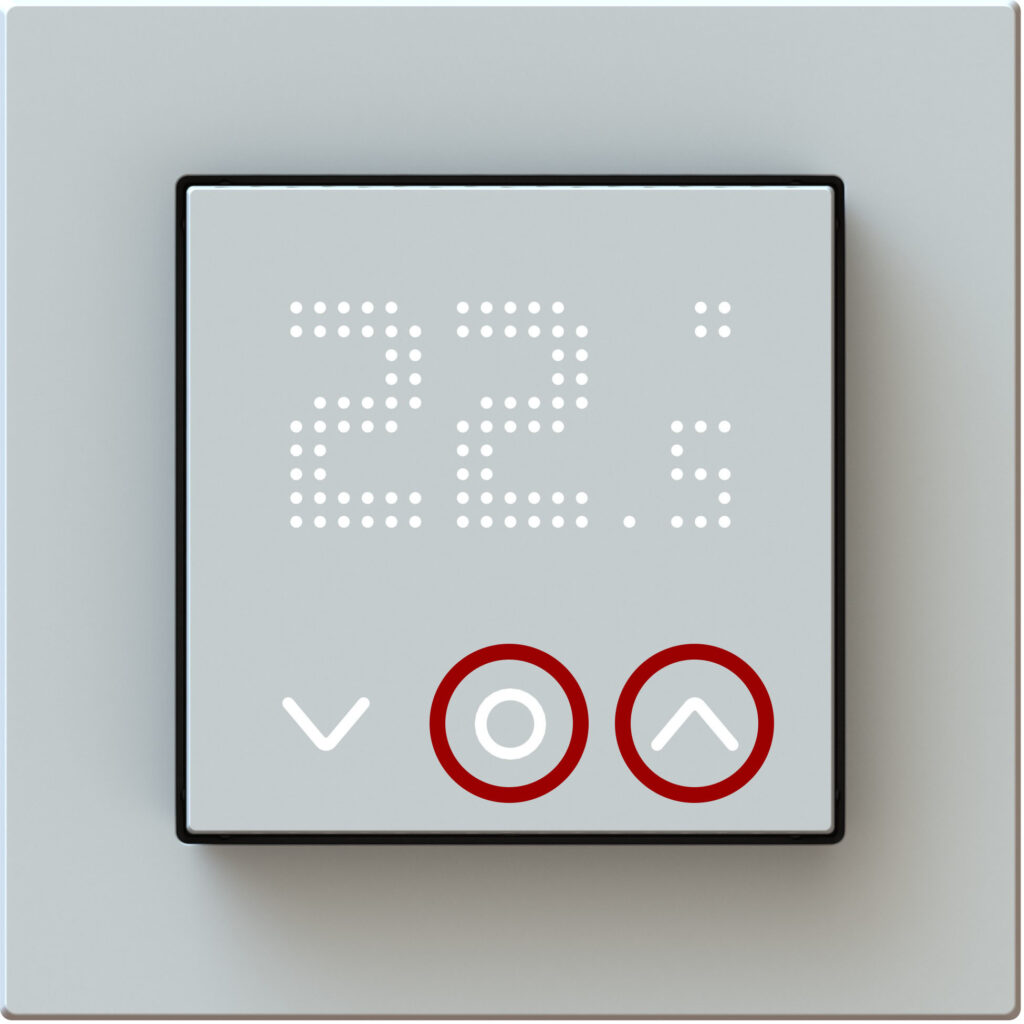
Press and hold simultaneously the following keys for 10 sec.:

The DOF display will then appear, confirming the setting. After about 30 seconds the display switches to standby mode.

Only the system and function keys are then visible. Changes to the set temperature can still be made.

Switching off
Press and hold simultaneously the following keys for 10 sec.:

The DON display will then appear, confirming the setting.

Updated on January 13, 2026
Operating lockSwitching the device on / off

© 2024 | 300724

  • Supportrequest
  • Privacy Statement
  • Imprint
  • Supportrequest
  • Privacy Statement
  • Imprint