
Skip to content
Logo
  • English
    • German

Alpha direct Balance base station

  • Intended use
  • Device overview
  • Montage
  • Electric connection
  • LED signaling
  • Commissioning mode
  • Automated hydraulic balancing
  • Maintenance
  • Disassembly
  • Hydraulic balancing remains necessary
  • Automatic heat distribution
  • Flow limiter not required
  • Cross-distribution network balancing required
  • Base station learning phase
  • Calibration
  • Compatibility
  • Cooling application
  • Switching between heating and cooling
  • Boiler control system
  • Bypassing heating zones
  • Valve protection

Alpha direct downloads

  • Alpha direct Balance Downloads
  • Alpha direct Balance Switch / Balance Switch Modbus downloads
  • TÜV certificates
  • Alpha direct Thermostat 55 Matrix downloads

Balance NFC app

  • Requirements for using NFC
  • Privacy policy
  • App functions
  • Download the app

Alpha direct thermostat 55 Matrix

  • Connection diagram / port overview
  • Function »Heating– Cooling«
  • Setting the corresponding parameters
  • Setting the target temperature
  • Operating lock
  • Set display to standby mode
  • Switching the device on / off
  • RMO (operating mode)
  • BOS (Boost)
  • PRG (heating program)
  • Setting up heating programs
  • VAT (Temperature holiday mode)
  • BRW / BRS (Display brightness)
  • NET (Set up WiFi)
  • DAT (date, time)
  • SWT (summer time / winter time)
  • INS (Installer)
  • CMO (control algorithm)
  • WEH (type of heating)
  • SMO (sensor mode)
  • DIF (Hysteresis)
  • ADP (Smart Start)
  • FLT (Temperature limiter floor sensor)
  • VAL (operating principle)
  • VPA / VPD (Valve protection)
  • TSS (temperature unit)
  • WMO (manual heating / cooling)
  • CAR / CAF / CAE (calibration)
  • ALO / AHI (setpoint limiter)
  • FLO / FHI (setpoint limiter)
  • ELO / EHI (setpoint limiter)
  • ANT (time automatically)
  • COL (block cooling)
  • FAC (factory reset)
  • ESC (exit)
  • Alpha smart app

Automated hydraulic balancing

  • How it works
  • A practical guide for technicians: Hydraulic balancing using automated systems
  • Applying for government grants
  • TÜV certificates

Alpha direct Balance Switch base station

  • Intended use
  • Device overview
  • Montage
  • Electric connection
  • LED signaling
  • Commissioning mode
  • Automated hydraulic balancing
  • Maintenance
  • Disassembly
  • Balance NFC app
  • Hydraulic balancing remains necessary
  • Automatic heat distribution
  • Flow limiter not required
  • Cross-distribution network balancing required
  • Base station learning phase
  • Calibration
  • Compatibility
  • Cooling application
  • Switching between heating and cooling
  • Boiler control system
  • Bypassing heating zones
  • Valve protection

Alpha direct Balance Switch Modbus base station

  • Intended use
  • Device overview
  • Montage
  • Electric connection
  • LED signaling
  • Commissioning mode
  • Automated hydraulic balancing
  • Register description
  • Maintenance
  • Disassembly
  • Balance NFC app
  • Hydraulic balancing remains necessary
  • Automatic heat distribution
  • Flow limiter not required
  • Cross-distribution network balancing required
  • Base station learning phase
  • Calibration
  • Compatibility
  • Cooling application
  • Switching between heating and cooling
  • Boiler control system
  • Bypassing heating zones
  • Valve protection
View Categories
  • Systemauswahl
  • Alpha direct
  • Balance NFC app
  • Requirements for using NFC

Requirements for using NFC

0:00 / 0:31
  • View as Markdown Open this page as plain Markdown (opens in a new tab)
  • Open in ChatGPT Ask questions about this page (opens in a new tab)
  • Open in Claude Ask questions about this page (opens in a new tab)
  • Open in Google AI Studio Ask questions about this page (Google account required) (opens in a new tab)
  • Knowledge of the existence and position of the NFC interface in the mobile device: The position of the NFC interface varies depending on the model.
  • NFC function enabled
  • screen lock deactivated

Remove protective covers before using NFC. Ensure a stable hold to avoid disconnections. The distance required to establish an NFC connection depends on the mobile device used.

Further information on the steps to follow for specific models can be found in the manufacturer’s instructions.
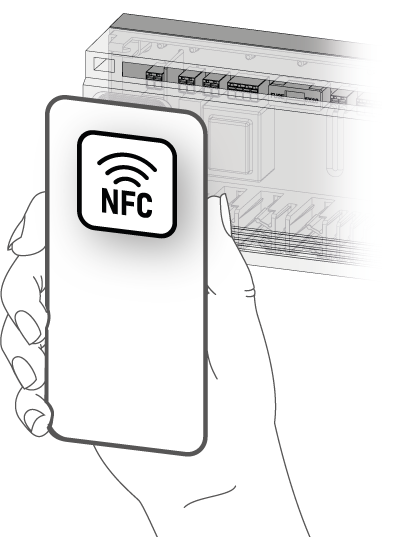
Further information on the steps to follow for specific models can be found in the manufacturer’s instructions.

Updated on September 15, 2026
Download the appPrivacy policy

© 2024 | 300724

  • Supportrequest
  • Privacy Statement
  • Imprint
  • Supportrequest
  • Privacy Statement
  • Imprint