
Skip to content
Logo
  • English
    • German

Alpha direct Balance base station

  • Intended use
  • Device overview
  • Montage
  • Electric connection
  • LED signaling
  • Commissioning mode
  • Automated hydraulic balancing
  • Maintenance
  • Disassembly
  • Hydraulic balancing remains necessary
  • Automatic heat distribution
  • Flow limiter not required
  • Cross-distribution network balancing required
  • Base station learning phase
  • Calibration
  • Compatibility
  • Cooling application
  • Switching between heating and cooling
  • Boiler control system
  • Bypassing heating zones
  • Valve protection

Alpha direct downloads

  • Alpha direct Balance Downloads
  • Alpha direct Balance Switch / Balance Switch Modbus downloads
  • TÜV certificates
  • Alpha direct Thermostat 55 Matrix downloads

Balance NFC app

  • Requirements for using NFC
  • Privacy policy
  • App functions
  • Download the app

Alpha direct thermostat 55 Matrix

  • Connection diagram / port overview
  • Function »Heating– Cooling«
  • Setting the corresponding parameters
  • Setting the target temperature
  • Operating lock
  • Set display to standby mode
  • Switching the device on / off
  • RMO (operating mode)
  • BOS (Boost)
  • PRG (heating program)
  • Setting up heating programs
  • VAT (Temperature holiday mode)
  • BRW / BRS (Display brightness)
  • NET (Set up WiFi)
  • DAT (date, time)
  • SWT (summer time / winter time)
  • INS (Installer)
  • CMO (control algorithm)
  • WEH (type of heating)
  • SMO (sensor mode)
  • DIF (Hysteresis)
  • ADP (Smart Start)
  • FLT (Temperature limiter floor sensor)
  • VAL (operating principle)
  • VPA / VPD (Valve protection)
  • TSS (temperature unit)
  • WMO (manual heating / cooling)
  • CAR / CAF / CAE (calibration)
  • ALO / AHI (setpoint limiter)
  • FLO / FHI (setpoint limiter)
  • ELO / EHI (setpoint limiter)
  • ANT (time automatically)
  • COL (block cooling)
  • FAC (factory reset)
  • ESC (exit)
  • Alpha smart app

Automated hydraulic balancing

  • How it works
  • A practical guide for technicians: Hydraulic balancing using automated systems
  • Applying for government grants
  • TÜV certificates

Alpha direct Balance Switch base station

  • Intended use
  • Device overview
  • Montage
  • Electric connection
  • LED signaling
  • Commissioning mode
  • Automated hydraulic balancing
  • Maintenance
  • Disassembly
  • Balance NFC app
  • Hydraulic balancing remains necessary
  • Automatic heat distribution
  • Flow limiter not required
  • Cross-distribution network balancing required
  • Base station learning phase
  • Calibration
  • Compatibility
  • Cooling application
  • Switching between heating and cooling
  • Boiler control system
  • Bypassing heating zones
  • Valve protection

Alpha direct Balance Switch Modbus base station

  • Intended use
  • Device overview
  • Montage
  • Electric connection
  • LED signaling
  • Commissioning mode
  • Automated hydraulic balancing
  • Register description
  • Maintenance
  • Disassembly
  • Balance NFC app
  • Hydraulic balancing remains necessary
  • Automatic heat distribution
  • Flow limiter not required
  • Cross-distribution network balancing required
  • Base station learning phase
  • Calibration
  • Compatibility
  • Cooling application
  • Switching between heating and cooling
  • Boiler control system
  • Bypassing heating zones
  • Valve protection
View Categories
  • Systemauswahl
  • Alpha direct
  • Alpha direct Balance Switch base station
  • Electric connection

Electric connection

0:00 / 1:52
  • View as Markdown Open this page as plain Markdown (opens in a new tab)
  • Open in ChatGPT Ask questions about this page (opens in a new tab)
  • Open in Claude Ask questions about this page (opens in a new tab)
  • Open in Google AI Studio Ask questions about this page (Google account required) (opens in a new tab)

Warning! Electrical voltage! Danger to life!
Before opening, de-energize the base and secure it against being re-energized.
Disconnect any external voltages connected to the unit and secure it against accidental re-energization.

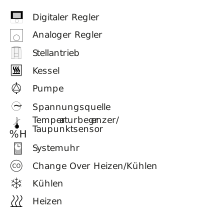
For the connection of the power supply, the cable cross-sections must be 0.75 mm² – 1.5 mm² for 24 V or 1.5 mm² for 230 V. Depending on the voltage version of the base, it is possible to take L1 and L2, or L and N, as well as the protective conductor, from the base. A temperature limiter/dew point sensor can be connected to the TB/%H contact. If this contact is not used, it must be bridged (provided for at the factory). The bridge must be removed when a connection is established at contact is TB/%H. The temperature limiter/dew point sensor must be designed as a normally closed contact.
The activation of the special functions as well as the setting of “Disable cooling” and the assignment of the inputs to the outputs can only be set via the app. The external system clock transmits the input signal to the connected thermostats.
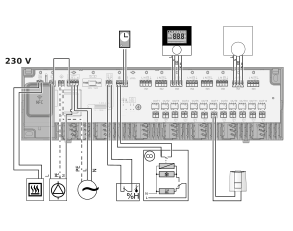

The 24 V version of the base station must have a voltage supply via a safety transformer in accordance with EN 61558-2-6 or a Class II transformer in accordance with UL for North America.
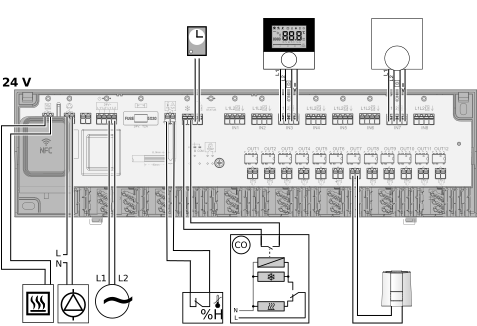
The following parameters can be set via the app:

Switch-on delay of the pumpdefault: 2 minutes
Pump follow-up timedefault: 2 minutes
Switch-on delay of the boilerdefault: 0 minutes
Nachlaufzeit Boilerdefault: 0 minutes
Maximum inactive time of the pump before the pump protection function starts default: 3 days
Activation time of the pump (pump protection function) default: 5 minutes
Maximum inactive time of the valve before the valve protection function starts default: 16 days
Valve actuation time (valve protection function)default: 5 minutes

If the base station is configured in a de-energized state, these changes are not applied until the next time power is applied.

A room controller can be assigned to each actuator. Options in the app:

  • Adjustment of the listed factory settings
  • Assignment of names for the corresponding rooms
ActuatorsRoom thermostat
1 + 21
3 + 42
5 + 63
7 + 84
95
106
117
128
Updated on September 29, 2026
MontageLED signaling

© 2024 | 300724

  • Supportrequest
  • Privacy Statement
  • Imprint
  • Supportrequest
  • Privacy Statement
  • Imprint