
Skip to content
Logo
  • English
    • German

Alpha direct Balance base station - EN

  • Intended use
  • Device overview
  • Montage
  • Electric connection
  • LED signaling
  • Commissioning mode
  • Automated hydraulic balancing
  • Maintenance
  • Disassembly

Balance NFC app

  • Requirements for using NFC
  • Privacy policy
  • App functions
  • Download the app

Automatic hydraulic balancing AD EN

  • How it works
  • A practical guide for technicians: Hydraulic balancing using automated systems

Alpha direct Balance Switch base station EN

  • Compatibility
  • Hydraulic balancing remains necessary
  • Automatic heat distribution
  • Flow limiter not required
  • Cross-distribution network balancing required
  • Intended use
  • Device overview
  • Montage
  • Electric connection
  • LED signaling
  • Commissioning mode
  • Automated hydraulic balancing
  • Maintenance
  • Disassembly
  • Balance NFC app
View Categories
  • Systemauswahl
  • Alpha direct
  • Alpha direct Balance base station - EN
  • Montage

Montage

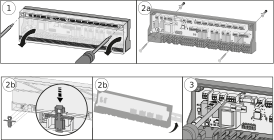
  1. Take off the cover.
  2. Install the base. In case of wall mounting, fix the base to the wall with 2 screws Ø 4 mm and corresponding dowels according to the quality of the wall. In case of installation on a mounting bracket, use a bracket TS 35/7.5.
  3. Establish the electrical connection.
  4. Fit the cover.
  5. Switch on the supply voltage.

Updated on September 14, 2026
Electric connectionDevice overview

© 2024 | 300724

  • Supportrequest
  • Privacy Statement
  • Imprint
  • Supportrequest
  • Privacy Statement
  • Imprint