
Skip to content
Logo
  • English
    • German

Alpha direct Balance base station - EN

  • Intended use
  • Device overview
  • Montage
  • Electric connection
  • LED signaling
  • Commissioning mode
  • Automated hydraulic balancing
  • Maintenance
  • Disassembly

Balance NFC app

  • Requirements for using NFC
  • Privacy policy
  • App functions
  • Download the app

Automatic hydraulic balancing AD EN

  • How it works
  • A practical guide for technicians: Hydraulic balancing using automated systems

Alpha direct Balance Switch base station EN

  • Compatibility
  • Hydraulic balancing remains necessary
  • Automatic heat distribution
  • Flow limiter not required
  • Cross-distribution network balancing required
  • Intended use
  • Device overview
  • Montage
  • Electric connection
  • LED signaling
  • Commissioning mode
  • Automated hydraulic balancing
  • Maintenance
  • Disassembly
  • Balance NFC app
View Categories
  • Systemauswahl
  • Alpha direct
  • Alpha direct Balance Switch base station EN
  • Montage

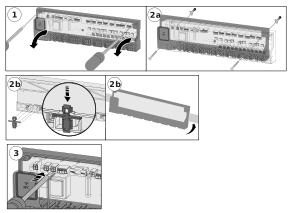
Montage

  1. Take off the cover.
  2. Install the base. In case of wall mounting, fix the base to the wall with 2 screws Ø 4 mm and corresponding dowels according to the quality of the wall. In case of installation on a mounting bracket, use a bracket TS 35/7.5.
  3. Wire the electrical connections.
  4. Carefully mount the cover. Make sure that the bend of the NFC antenna is close to the lid.
  5. Switch on the supply voltage.

Updated on September 14, 2026
Electric connectionDevice overview

© 2024 | 300724

  • Supportrequest
  • Privacy Statement
  • Imprint
  • Supportrequest
  • Privacy Statement
  • Imprint